On this page
Language
Save and compare diagram versions
A version is a saved snapshot of a diagram that never changes. Save one each time the design moves on, then compare any two to see what changed, and let other diagrams use a version by its tag.
The examples on this page use one design, saved as orders.proschi:
title "Orders"

shopper "Shopper"     [Browser]
api     "Orders API"  [REST API] x3
cache   "Order cache" [Redis]
db      "Orders DB"   [PostgreSQL] x2

shopper -> api   : HTTPS
api     -> cache : RESP
api     -> db    : SQL

usecase "Order status" {
  shopper -> api     : GET /orders/42
  api     -> cache   : GET order:42
  api    --> shopper : 200
}

traffic {
  "Order status" 3k rps
}

requirements {
  p99 "Order status" < 50ms
}
Try it: change
cachetodbin the second step, then open the Results tab: the p99 goes from 38.2 ms to 49.4 ms, just under the 50 ms limit.
1. Keep the diagram in your account #
Versions live in your Proschi account, not in the browser. Sign in with GitHub or Google in the editor, and your diagrams sync to the account. If the diagram stays in this browser only, the panel offers Keep in cloud. If cloud sync is off, it offers Turn on cloud sync.
2. Save a version #
Open File → Versions…. Type a tag, add a note if you like, and press Save version.
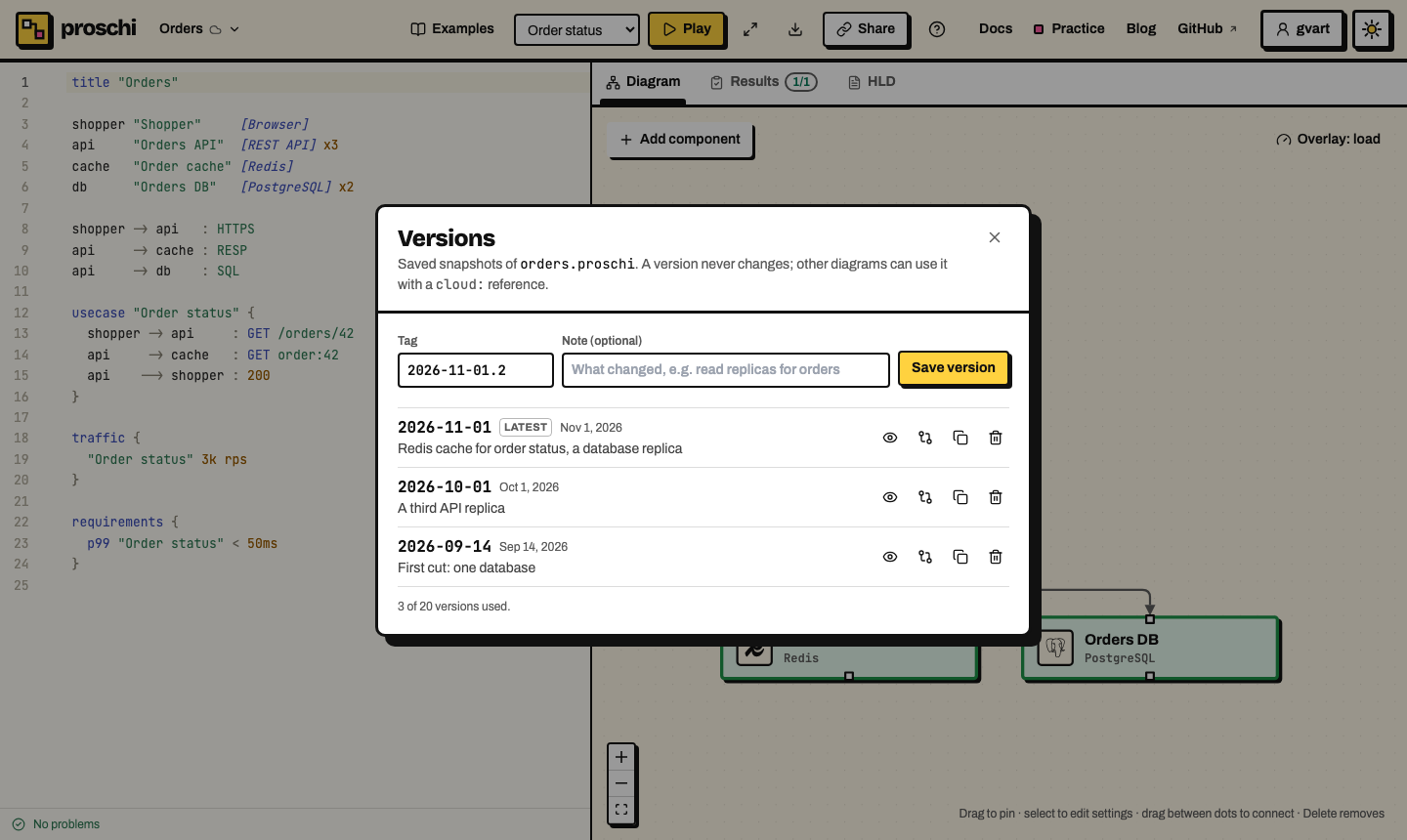
- Tags are free text: letters, digits,
.,_and-, starting with a letter or digit, up to 64 characters. The panel suggests today's date (2026-11-01), because a date reads well in a reference and sorts.v2orbefore-shardingwork too. Tags are case-sensitive. latestis reserved. It always means the newest saved version, never the unsaved draft you are editing.- A version never changes. It stores the diagram's text and the files it imports as they were when you saved.
- The note is optional, up to 280 characters.
3. View and compare versions #
Each row has four buttons:
| Button | What it does |
|---|---|
| View | Opens the version read-only: its text, its diagram and its note. |
| Compare | Compares the version with your current draft. |
| Copy reference | Copies cloud:orders:<tag>, or a whole system block that uses it. |
| Delete | Deletes the version, after you confirm. |
In the compare view, pick any two sides in the Base and Target lists: a saved version or the current draft. The diagram is the target, with what it added marked NEW and what it changed marked CHANGED. The left column puts the simulation numbers side by side (traffic, worst p99, availability, cost and tests) and lists every change.
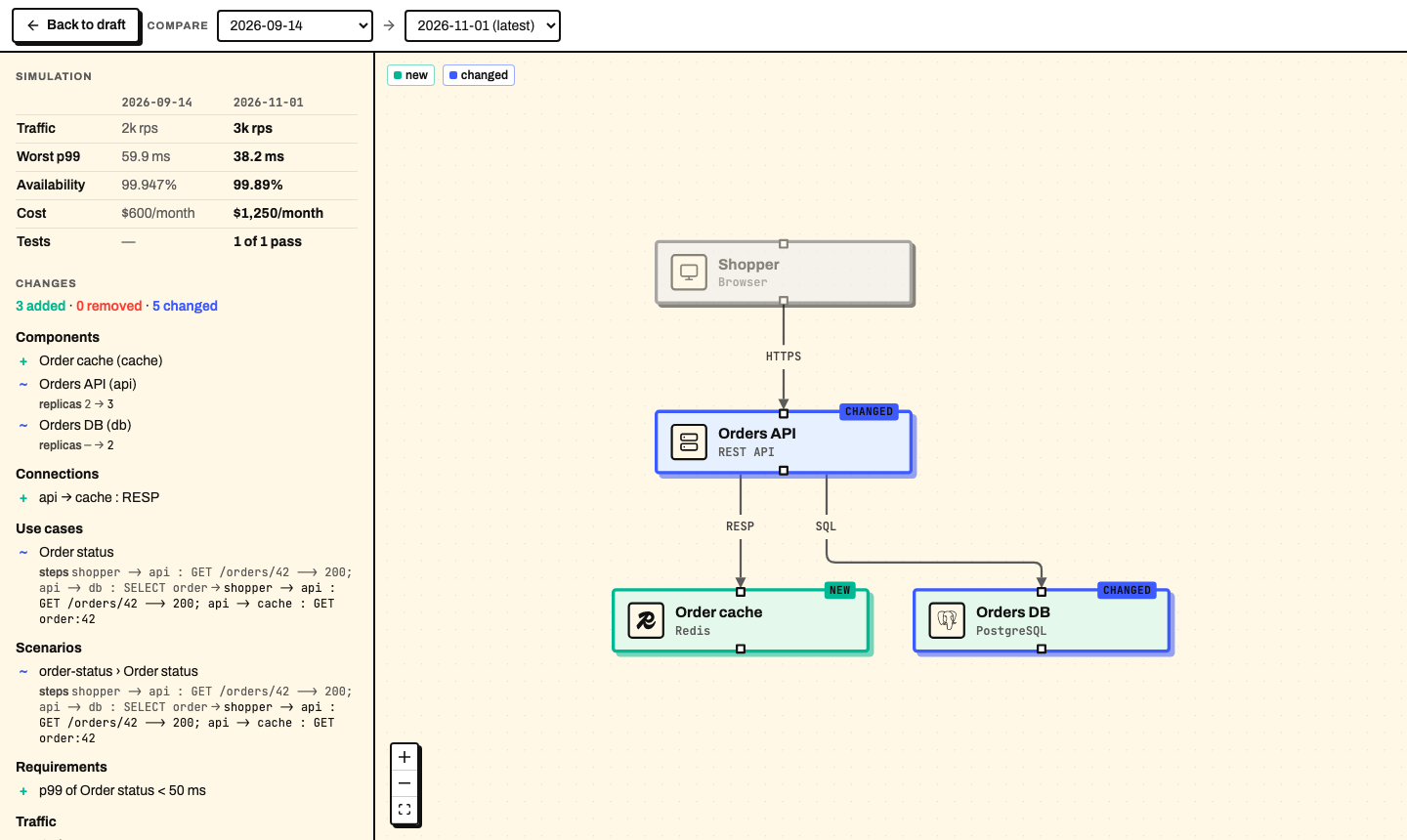
To present a new design, save it as a version and open the compare view with the old version as the base. Reviewers see what is new on the canvas and what it costs in the table.
The comparison is structural. It matches nodes, use cases and systems by id, and connections by their two ends. Moving a line or reformatting the file is not a change. A renamed id shows as one removal and one addition.
4. Restore or delete a version #
Restore into draft, in the view of a version, replaces the draft's text with the version's. The version stays as it was, and Undo in the banner puts your draft back.
Delete removes a version for good. Diagrams that use it stop resolving.
Its tag stays taken for that diagram, so cloud:orders:2026-09-14 can never
point at different content later. Deleting a version frees its place in the
limit below.
5. Use a version in another diagram #
Another diagram in your account can draw a version as a team box, or import it:
system orders "Order Processing" @Orders {
  from "cloud:orders:2026-11-01"
  expose api -> "Order status"
}
See team systems from your account for the box, and cloud sources for how the reference resolves and how the command line pins it.
6. Read versions from the command line #
Sign in once with proschi login,
then:
proschi versions list orders
proschi versions diff orders 2026-09-14
proschi versions diff orders 2026-09-14 2026-10-01
proschi versions diff orders 2026-11-01 orders.proschi
list prints the tags, dates, sizes and notes, newest first. diff
compares a version with latest, with a second version, or with a local
file. The name is the diagram's file name, with or without .proschi. diff
prints added (+), removed (-) and changed (~) nodes, edges, use cases,
scenarios, requirements, traffic, capacity and systems, then the counts.
--json prints the same for scripts. Both commands only read the account.
Limits #
Limits are set per account plan. On the free plan, an account keeps:
| What | Free plan |
|---|---|
| Diagrams synced to the account | 5 |
| Versions per diagram | 20 |
| Size of a diagram with its imports | 64 KiB |
The panel shows how many versions a diagram uses. Deleting a diagram from the account deletes its versions too. What the account stores is listed in Privacy.
Go further #
- Org diagrams and team systems: draw each team as one box.
- Imports:
cloud:sources andproschi.lock. - Sharing: a link carries the versions a diagram uses.