On this page
Language
Scenarios
One endpoint rarely has one outcome. Scenario blocks, written with alt,
split a use case into its success path and each way it fails, without
copying the steps they share.
gateway  "API Gateway"   [AWS API Gateway]
orders   "Order Service" [REST API]
ordersDb "Orders DB"     [PostgreSQL]
audit    "Audit log"     [AWS SQS]

gateway -> orders   : HTTP
orders  -> ordersDb : SQL
gateway -> audit    : Publish

usecase "Get order" {
  gateway -> orders : GET /api/orders/42   # shared by every scenario

  alt "Found" {
    orders -> ordersDb  : SELECT order 42
    orders --> gateway  : 200 {"id": 42}
  } alt "Not found" when "no order has that id" {
    orders -> ordersDb  : SELECT order 42
    orders --> gateway  : 404 {"error": "not_found"}
  } alt "DB timeout" {
    orders -x ordersDb  : SELECT order 42
    orders --> gateway  : 504
  }

  gateway ->> audit : OrderViewed          # shared again, after them
}
Try it: pick "Get order › DB timeout" in the example and press Play. The failed call and the 504 are drawn in red.
The block is alt "Name" [when "condition"] { … }, inside a use case or
another scenario.
How branches combine #
- A set of alternatives. Scenario blocks that follow each other directly are one set, whether the next opens on the same line or the next. A step between two blocks starts a new set.
- Shared steps. Each branch becomes a scenario. Steps before and after a set belong to every branch. A response inside a branch may answer a request made before it.
- Nesting. Nested sets, and sets in a row, multiply: two sets of two branches give four scenarios, named like "A › X". A use case keeps at most 32.
- No blocks. A use case without scenario blocks has a single scenario.
Error paths and conditions #
A scenario is an error path when the use case's first request is answered with a 4xx or 5xx status, or fails. Playback draws error replies and failed calls in red.
when says when a branch happens, in free text. The editor shows it on the
scenario's tooltip and during playback. Nested conditions join with a dot:
"cache miss · db down".
In links, a scenario is named in lower case with dashes (not-found). See
Links that carry the diagram.
Parallel steps #
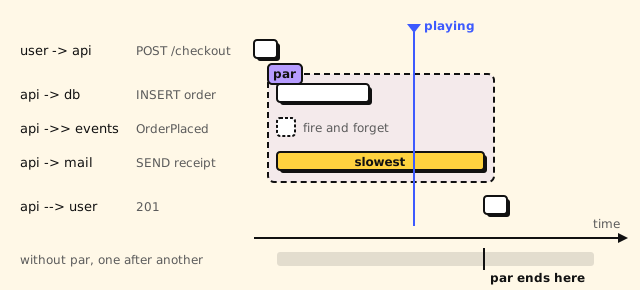
Steps in a par block run at the same time. The block's latency is its
slowest step, not the sum.
user   "Shopper"      [Browser]
api    "Checkout API" [REST API]
db     "Orders DB"    [PostgreSQL]
events "Order events" [AWS SNS]
mail   "Email"        [SendGrid]

user -> api   : HTTPS
api -> db     : SQL
api -> events : Publish
api -> mail   : HTTPS

usecase "Checkout" {
  user -> api : POST /checkout
  par {
    api -> db      : INSERT order
    api ->> events : OrderPlaced
    api -> mail    : SEND receipt
  }
  api --> user : 201
}
A par block goes inside a use case or a scenario, and holds steps
only: no par or alt inside it.
Grouping by endpoint #
The editor's use case picker groups use cases by the method and path of their first step. Those that don't start with an HTTP call go under Other flows. Paths with different ids share a group:
- A path with a placeholder groups by itself: GET /orders/{id}.
- Otherwise, a concrete path joins a placeholder path of another use case with the same method, where a placeholder stands for exactly one segment: GET /orders/order-789 joins GET /orders/{id}.
- Otherwise, segments that are all digits or a UUID count as an id, so GET /orders/42 and GET /orders/43 group as GET /orders/{id}.