On this page
Language
Use cases
A use case is a request flow, written step by step over the architecture. You play it in the editor, and the simulation reads its steps to work out each request's load, latency and cost.
title "Photo feed"

user  "Mobile app"  [Mobile App]
api   "Feed API"    [REST API]
db    "Posts DB"    [PostgreSQL]
cache "Feed cache"  [Redis]
blobs "Photos"      [AWS S3]

user -> api   : HTTPS
api  -> db    : SQL
api  -> cache : RESP
api  -> blobs : HTTPS

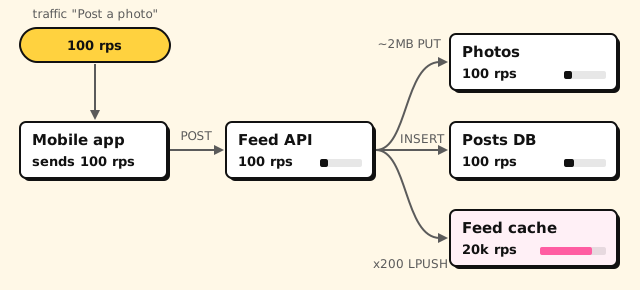
usecase "Post a photo" "Upload, save, fan out to followers" {
  user -> api   : POST /posts {"caption": "Sunset"}
  api  -> blobs : ~2MB PUT /photos/{id}
  api  -> db    : INSERT post
  api  -> cache : x200 LPUSH feed:{follower}
  api --> user  : 201 {"id": 42}
}
Try it: press Play on "Post a photo", and each step lights up its arrow in turn, ending with the 201.
The block is usecase "Name" ["Description"] { … }, at the top level.
Use case steps #
Each step is an arrow between two nodes, and a label:
| Arrow | Meaning |
|---|---|
a -> b : … |
A synchronous request: a waits for the answer. |
a ->> b : … |
An asynchronous message, fire and forget, unless a reply follows. |
b --> a : … |
The response to the latest unanswered request from a to b. |
a -x b : … |
A failed call that never gets an answer: a timeout, a refused connection. |
The label is free text, but some shapes have a meaning:
- HTTP. A label that starts with GET, POST, PUT, PATCH, DELETE, HEAD or
OPTIONS and a path sets the endpoint. The path may have placeholders such
as
/orders/{id}. - Payload. After the path, a body that starts with
{,[or<is JSON or XML, or name it withjson,xmlortext. A JSON body may span lines until its brackets balance. - Status. On a response, a leading three-digit number is the status code.
- Step name. Any other text names the step, such as
INSERT post.
The command line can check these steps against OpenAPI specs.
Fan-out and payload size #
Two optional prefixes on a request label say how much work a step is:
| Prefix | Meaning |
|---|---|
x<N> |
N calls per request (N ≥ 1). Load counts all N; latency counts one, as if batched. |
~<size> |
Payload size in B, KB, MB, GB or TB (decimal: 1 MB is 1000 KB). Adds transfer time and egress cost. |
They come in either order, at the very start of a request label, followed
by a space. So "xml payload" and "GET /x200" read as written. A zero count,
a repeated prefix and a malformed size (~2mb, ~MB) are errors.
Responses and connection labels take no prefixes.
Reads and writes #
The simulation counts reads and writes apart, since a store takes far fewer writes than reads. Each request step is one or the other:
- With an HTTP method: POST, PUT, PATCH and DELETE write. GET, HEAD and OPTIONS read.
- Otherwise the first word of the label decides, after any prefixes, ignoring case, whole words only. The verbs below write.
- Everything else reads: SELECT, QUERY, SCAN, FETCH, an event name such as OrderPlaced, and so on.
| Write verbs | Typical labels |
|---|---|
| INSERT, UPDATE, UPSERT, DELETE, CREATE | INSERT order, UPDATE seat SET held |
| PUT, SET, WRITE, APPEND, SAVE, STORE, UPLOAD, COMMIT, RECORD, MARK | PUT pastes/k7Qz2, STORE body, MARK paid |
| PUTITEM, UPDATEITEM, DELETEITEM, BATCHWRITEITEM | DynamoDB: PutItem Url |
| INCR, INCRBY, DECR, HINCRBY, LPUSH, RPUSH, ZADD, HSET, SADD, XADD, MSET, GEOADD | Redis: INCR rate:42, ZADD feed:7 p_981 |
| RESERVE, HOLD, BOOK, CHARGE | Claiming a resource or money: HOLD seat 12A, CHARGE card |
| PUBLISH, SEND, ENQUEUE, PRODUCE, EMIT, NOTIFY | Handing something on: EMIT OrderShipped, NOTIFY bob |
Words that only start like a verb (Stored, Booking, Notification) read. Durability requirements count write steps only.
A step's protocol is inferred too: messaging for an async arrow or a queue or broker target; REST for an HTTP method (or GraphQL, gRPC or SOAP when the target's tech says so); "other" for the rest.
Steps follow the architecture #
A step between two nodes that no connection joins, in either direction, is a warning, and the language server offers to add the connection. A node may call itself, and a document with no connections at all is not checked.