On this page
Release 0.14.0
Diagram versions and cloud references
For: You keep designs in your Proschi account and want to track how they change, or connect several teams' designs in one org diagram.
A diagram saved in your Proschi account can now have versions: snapshots
with a tag that never change. You can compare any two, with what changed
marked on the canvas and the simulation numbers side by side. Other
diagrams can use a version through a cloud: reference, so an org diagram
can show each team's design as that team saved it.
What shipped #
In the editor, under Diagrams → Versions…:
- Save version with a tag and an optional note. The tag defaults to
today's date (
2026-11-01), andv2orbefore-shardingwork too. - View a version read-only, and Restore into draft to start from it again. Undo brings the draft back.
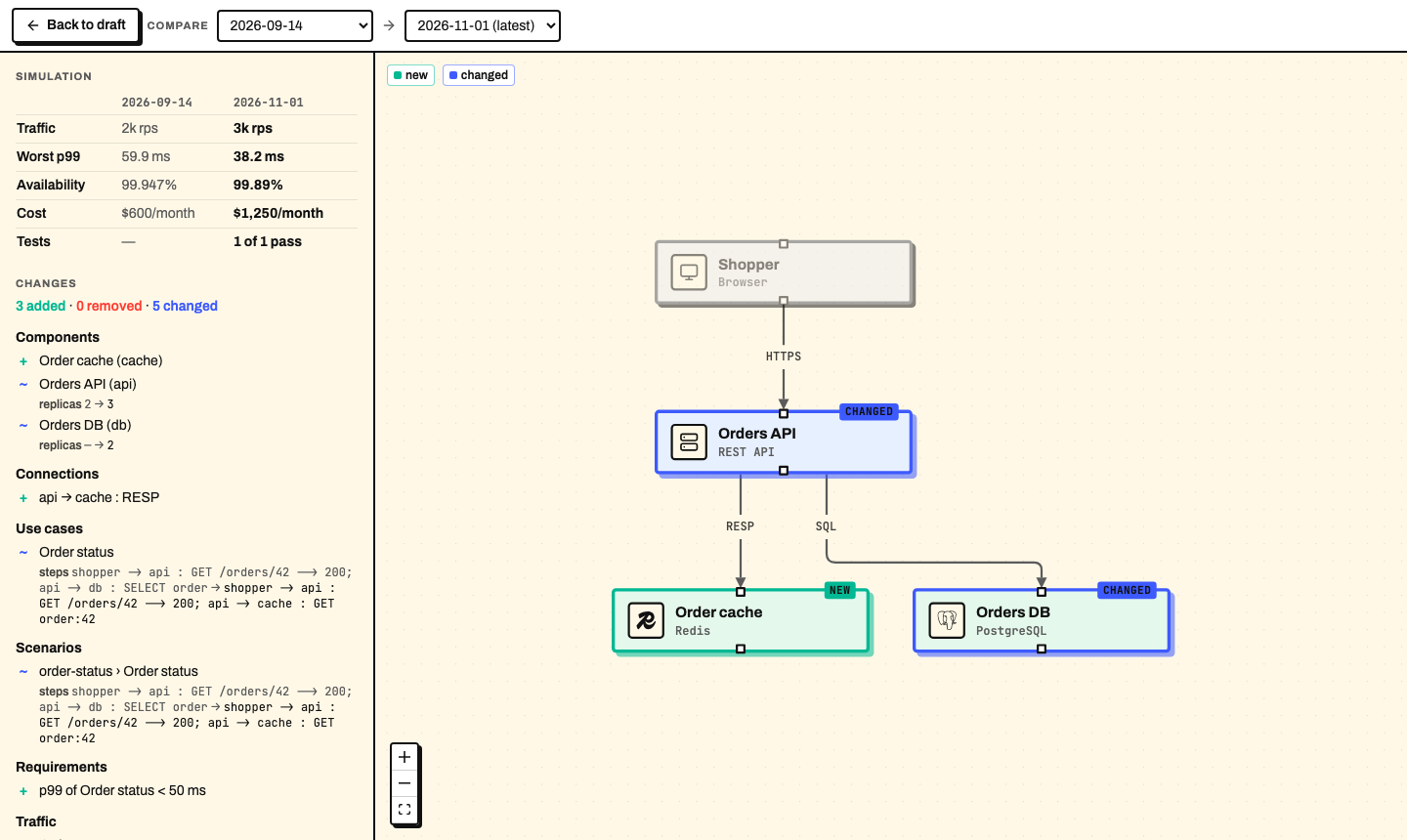
- Compare any two versions, or a version and your draft. New nodes are marked NEW, changed ones CHANGED, and a table puts traffic, worst p99, availability, cost and tests side by side.
- Copy reference copies
cloud:orders:2026-11-01, or a wholesystemblock that uses it.
In the language, a cloud:<name>:<tag> source works wherever a path does:
in import and in a system's from. cloud:orders means
cloud:orders:latest, the newest saved version.
On the command line:
proschi login,proschi whoamiandproschi logout.proschi versions list <name>andproschi versions diff <name> <base-tag> [<target-tag>|<file>].proschi imports syncpinscloud:sources inproschi.lockwith the version's tag and sha256.--updatemoveslatestpins to the newest version.
What problem it solves #
A design changes every few weeks. Before, the only record was git history of the text, if the file was in git at all, and nothing showed what the change did to latency or cost. Now you save a version at each step. To present a new design, open the compare view with the old version as the base. The reviewer sees the new cache on the canvas, and that worst p99 went from 59.9 ms to 38.2 ms while the cost went from $600 to $1,250 a month.
The second problem is the org diagram. Team systems draw each team as a box, built from that team's design file. That file had to sit in your project or in a git repository. Now a team's design can come straight from your account, pinned to the version the team saved:
system orders "Order Processing" @Orders {
  from "cloud:orders:2026-11-01"
  expose api -> "Order status"
}
A tag never changes, so the box shows the same design until you move it to
a newer tag. latest follows the newest saved version, never the draft
someone is still editing.
How to use it #
-
In the editor, sign in with GitHub or Google so your diagrams sync to your account.
-
Open Diagrams → Versions…, and press Save version.
-
Change the design, save another version, then press Compare on the first one.
-
In another diagram, paste the reference from Copy reference into a
systemblock or animport. -
On the command line, sign in once and pin the references:
proschi login
proschi imports sync
proschi versions diff orders 2026-09-14
proschi imports sync --update     # later: move latest pins forward
Here is the design from the picture above, as it was saved on 2026-11-01:
title "Orders"

shopper "Shopper"     [Browser]
api     "Orders API"  [REST API] x3
cache   "Order cache" [Redis]
db      "Orders DB"   [PostgreSQL] x2

shopper -> api   : HTTPS
api     -> cache : RESP
api     -> db    : SQL

usecase "Order status" {
  shopper -> api     : GET /orders/42
  api     -> cache   : GET order:42
  api    --> shopper : 200
}

traffic {
  "Order status" 3k rps
}

requirements {
  p99 "Order status" < 50ms
}
The full guide is Save and compare diagram versions, and the reference rules are in Cloud sources.
Who it is for #
Read this if you keep designs in your Proschi account and present changes to them, or if you draw an org diagram from several teams' designs.
If your diagrams live only in git, nothing changes: git: and local imports
work as before.
Some limits. A cloud: reference reads only your own account, so a team's
design must be saved in the account that draws the org diagram. Anyone you
send a share link to sees the versions it carries without an account. On
the free plan an account keeps 5 diagrams, 20 versions per diagram and
64 KiB per diagram. A diagram whose file name has a space cannot be
referenced until you rename it.