On this page
Release 0.12.0
Proschi diagrams in the Claude Code terminal
For: You use Claude Code and want to see an architecture or a request flow without leaving the terminal.
Proschi 0.12.0 draws diagrams inside Claude Code. When Claude answers with a
Proschi block, writes a .proschi file, or you run /proschi view, you get
the laid-out diagram in the terminal, not a wall of source.
What shipped #
The Proschi plugin for Claude Code now draws diagrams in three places:
- a
```proschifenced block in Claude's reply. The plugin also tells Claude to answer with one instead of Mermaid or ASCII art when it shows an architecture or a request flow; - a
.proschifile Claude writes or edits, under the tool call; - a file you name with
/proschi view <file>, in a pane that redraws when the file changes.
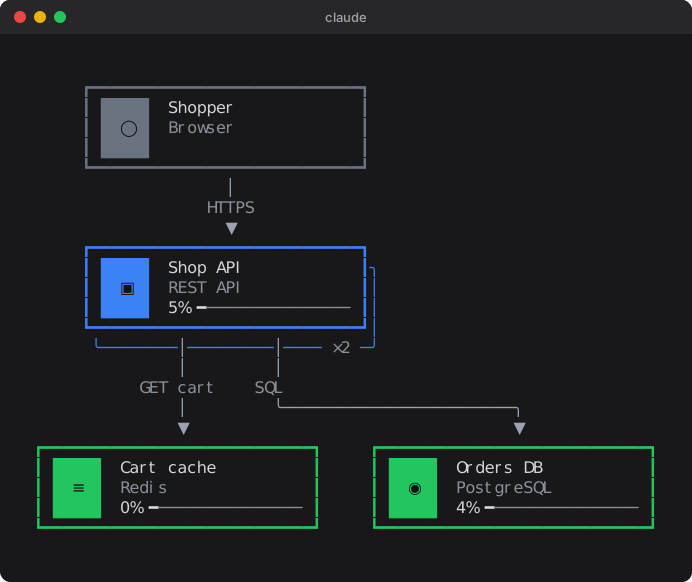
Each drawing uses the same layout as the browser. It has the cards with their
tech icons, groups, stacked replicas and the legend. When the diagram has
traffic, each card shows the simulation's load.
Under the drawing there is a use case picker and a player like the editor's: scenario tabs, the list of steps with each request and response, and play, pause and step controls. Buttons copy the source or a share link, or open the diagram in Proschi. ⛶ Focus moves the diagram into a pane you drive with the keyboard:
| Key | Does |
|---|---|
p |
Play or pause |
n / b |
Next or previous step |
r / e |
Restart, or jump to the end |
x |
Show or hide the use case explorer |
d |
Back to the diagram |
Esc |
Close the pane |
The full list is in Diagrams in the terminal. The change is pull request #164.
What problem it solves #
Before 0.12.0, when you asked Claude to sketch a design, you got Proschi
source in the reply. To see the diagram, you copied it into the editor or
opened a share link in the browser. To check a request flow, you read the
usecase block line by line.
Now the reply is the diagram. Ask "show me how an order flows through the
checkout" and you see the boxes, the arrows and the load on each node in
the same place you asked. Press play and the request moves from step to step.
When Claude edits a .proschi file in your repository, you see what the edit
did to the diagram under the tool call, before you open anything else.
How to use it #
-
Install the plugin in Claude Code, or update it if you already have it:
/plugin marketplace add gvart/proschi
/plugin install proschi@proschi
Already installed:
/plugin marketplace update proschi. -
Ask Claude for a diagram, for example "draw our checkout as a Proschi diagram with a use case for placing an order". The reply is drawn.
-
To watch a file you edit yourself, run:
/proschi view checkout.proschiThe pane redraws every time you save.
-
Pick Place order under the drawing and press play, or press ⛶ Focus and then
p.
This is the diagram from the picture above. Here it is live: press Play to watch the order go through, or open it in the editor.
user  "Shopper"    [Browser]
api   "Shop API"   [REST API]   x2
cache "Cart cache" [Redis]
db    "Orders DB"  [PostgreSQL]

user -> api   : HTTPS
api  -> cache : GET cart
api  -> db    : SQL

usecase "Place order" {
  user -> api   : POST /orders {"sku": "A1"}
  api  -> cache : GET cart
  api  -> db    : INSERT order
  api --> user  : 201 {"id": 42}
}

traffic {
  "Place order" 200 rps
}
When Claude puts this block in a reply, the plugin draws it as in the picture.
You need a Claude Code build with mod support (a plugin hooks module) and
Node 18 or newer on your PATH, because the layout runs in Node. The icons
are Nerd Font glyphs. If your terminal font is
not a Nerd Font, set the plugin's icons option to symbols, which works
with any font, or to none.
Who it is for #
This is for you if you use Claude Code and design or review systems in
conversation with it: sketching a new service, explaining an existing one,
or checking a change to a .proschi file in your repository.
If you don't use Claude Code, nothing changes for you. The editor, the
VS Code extension and the proschi CLI work as before.
Some limits to know. It draws in a terminal only; anywhere else a reply shows the block's source. Diagrams are fitted to the terminal's width (40 to 512 columns), so a wide diagram is cramped in a narrow window. The drawing is read-only: to change it, edit the source or open it in the editor.